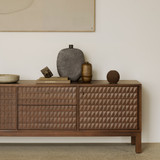
Designer TV stand in a styled living room

TV Stands + Media Consoles

A Calm Place
for the Screen

Clean lines, closed doors, and a surface that is yours to style. The screen recedes, and the room comes forward.

Shop All TV Stands + Media Consoles

Quickship

Set for the Season's Gatherings

Our Quickship collection arrives sooner than made-to-order furniture, so the screen can have its beautiful new setting in place before the holiday gatherings begin.

The Media Console Guide

How to Choose a TV Stand

A media console shares a wall with the screen, so its proportions matter as much as its storage. Five ideas for choosing one.

Designer TV stand in a styled living room

Start with the width of the screen

A console a little wider than the screen, with a few inches to spare on each side, looks grounded and balanced. Measure the screen first, and the width of the console follows.

Plan what it will hold

Components, game consoles, speakers, records, and remotes each need room of their own. Doors and drawers keep technology out of sight, and a piece made for vinyl gives a record collection a home within reach. Count what you own, and choose compartments to suit.

Choose the stance: legs, plinth, or suspended

A console on legs lets the floor run beneath and keeps a room open. A plinth base feels grounded and solid, and a suspended piece floats above the floor, leaving it clear for a rug and for cleaning. Decide how much of the floor you want to see.

Notice how it opens

Flip-down doors, hinged doors, and drawers each move differently. Picture reaching for a component from the sofa, and check that a door or drawer opens fully without meeting a wall or a chair.

Let the wall around the screen have a life of its own

A console is the base of a composition. A floor lamp to one side, art above or beside the screen, and a sculptural object or two give the wall as much interest as the screen itself.

The Uniek Edit

Dressing the Top of the Console

The Uniek Edit, our holiday gift guide, gathers sculptural objects, vessels, and candleholders for the top of the console.

Explore the Uniek Edit
Holiday gift ideas from the Uniek Edit

Questions

TV Stand + Media Console FAQs

How wide should a TV stand be for my screen?

Choose a console a little wider than the screen, with a few inches to spare on each side. A 55-inch screen measures about 48 inches wide, a 65-inch screen about 57 inches, and a 75-inch screen about 65 inches.

What is the difference between a TV stand and a media console?

The terms overlap. A TV stand is typically low and made to carry the screen, while a media console offers more storage, with doors and drawers for components, records, and games. Many pieces do both.

Can a sideboard be used as a TV stand?

Yes. A credenza or sideboard of the right height and depth can carry a screen and offers generous storage behind its doors. Check that the top is deep enough to hold the base of the screen.

How do I hide cables and components?

Closed doors and drawers keep components out of sight, and a piece with a cable opening at the back lets cords pass through to the wall. Gather the cables with a tie and keep a power strip inside the cabinet.

Can a TV stand hold a record player?

Yes. Choose a top deep enough for the turntable with some room around it, and keep records in a drawer or in a piece of vinyl storage nearby.

Can the screen be mounted on the wall above the console?

Yes. A wall-mounted screen frees the top of the console for a lamp, art, and objects, and the console gives the wall a base. Hang the screen so its center sits at eye level from the sofa.

How far should the sofa sit from the screen?

A distance of about 1.5 to 2.5 times the diagonal of the screen is comfortable. For a 65-inch screen, that places the sofa roughly 8 to 13 feet away.

Can you help me choose a TV stand?

Share the width of your screen and of the wall, along with what you would like the piece to hold, and Design Assistance can suggest consoles that fit the space.

Add Another Item To Compare
Compare